Channel link
Channel link is a feature introduced in v2.11 that grants a member JIT1 access to a text channel when joining a linked voice channel.
How it works
EnduraBot listens to all triggers of the on_voice_state_update event from the Discord API. This event fires any time a member leaves a channel, joins a channel, mutes/unmutes, or deafens/undefeans.
When EnduraBot sees someone join a channel, it checks to see if the target voice channel is linked to anything. If it is, EnduraBot verifies that the joining user doesn't have permission to see the linked text channel some other way, then read permission to the linked text channel is granted.
When EnduraBot sees someone leave a channel, it checks to see if the voice channel being left has a link. If so, EnduraBot verifies that the leaving user has specific read access to the linked text channel at that moment. If they do, it is revoked.
EnduraBot successfully detects users leaving or joining channels regardless of method. Timeouts, clicking "join event" from the events tab, being manually moved by Discord moderators, and so on all work as expected.
Any updates to links – whether added or deleted – take effect immediately.
Adding a new link
Warning
EnduraBot cannot tell the difference between voice and text channels. Providing IDs in the wrong order (e.g putting a text channel ID in the voice_channel argument) will not break anything, but the link will not function.
To check whether a link is malformed, use /cl-list. The order should always be <voice-channel> 🔗 <text-channel>.
A link can be created by typing command /cl-add. 2 arguments will appear: voice_channel and text_channel. The Discord ID for the relevant channels need to be provided. Getting Discord IDs is explained at the documention going over locally hosting EnduraBot.
Once executed, the link will be created.
Listing existing links
A list of channel links can be generated by using command /cl-list.
Deleting existing links
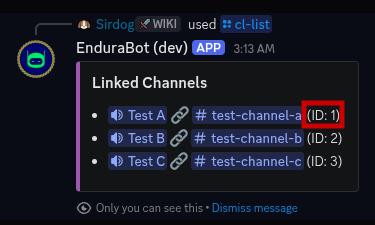
A screenshot of /cl-link with the UUID highlighted by a red box.
A link can be deleted by using /cl-remove. The only argument, id, accepts the UUID of the link; not a Discord ID. See the above image for how to find it.
-
Just in time ↩