Member monitor
Info
A user under the BAN level must be removed from monitoring before they can join. Otherwise, EnduraBot will just keep banning them.
Member monitor is a feature introduced in v2.5 which allows for the monitoring of incoming Discord accounts and performing 1 of 2 actions:
ALERTBAN
If ALERT, an embed is sent to the channel defined by the invite_alert_channel_id argument of data/variables.json. It will include the user's information, who placed them for monitoring, and why.
If BAN, everything that occurs for ALERT still occurs, but the member is then banned permanently.
How it works
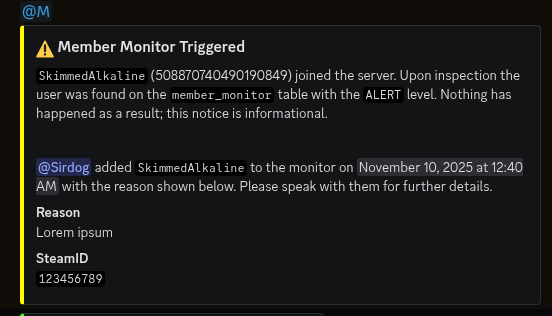
A screenshot of the output of the member monitor when a user joins with the ALERT level.
When an authorized member successfully completes execution of /monitor the information provided is stored in a database table.
The listener listener/member_monitor.py then listens to the on_member_join event of the Discord API. When someone joins, a check is made to see if their Discord ID matches any entry in the monitoring table. If so, an alert is sent to the invite_alert_channel_id channel and, if their level is BAN, they are also banned permanently with a generic message.
Checking who is being monitored
This information is purposefully obfuscated.
The philosophy of this feature is that such individuals and incidents should be out of sight, out of mind. Time should not be wasted thinking about them and what they might do until they try to access the server.
At this time, the only way to see who is being monitored without a join attempt is to review the SQLITE database directly. The information is stored in table member_monitor.
Removing someone from monitoring
To remove a user from monitoring, using /monitor, provide their Discord ID in the disc_id argument and set the action argument to Remove.