Member monitor
Info
If an account is placed for monitoring at the BAN level they must be removed from monitoring before they can join the server. Otherwise, even if unbanned manually, EnduraBot will just keep banning them.
The member monitor is a feature introduced in v2.5 which allows for the monitoring of incoming Discord accounts and performing 1 of 2 actions:
- Send an alert (
ALERT) - Send an alert and ban the account from the server (
BAN)
If set to ALERT an embed is sent to the channel defined by the invite_alert_channel_id argument of data/variables.json. It will include the user's information, who placed them for monitoring, and why.
If set to BAN, everything above occurs, but the account is also banned immediately.
Adding someone for monitoring
Warning
The Discord ID and Steam ID fields must be the purely numerical variants. The Steam ID variant beginning in STEAM_ will be rejected.
To add a user for monitoring, run /monitor and set the action argument to Add. All fields are required with the exception of the Steam ID field, though it is highly encouraged if it is known.
Checking who is being monitored
/monitor-list will provide the following information:
- Name
- Discord ID
- Member who placed the account for monitoring
- The date the account was placed for monitoring
The reason for an account being monitored, and the monitoring level, are obfuscated on purpose.
The philosophy of the member monitor is set and forget. An account may be monitored for many reasons, ranging from a routine internal note to documenting a genuinely dangerous individual. Because of this, EnduraBot treats the reason for monitoring as sensitive information: it is only surfaced when the monitored account attempts to join the server.
This also mitigates the Streisand effect. Freely visible reasons, even if written vaguely or redacted, could invite more curiosity than no entry at all. The monitoring level is similarly hidden: a visible BAN level could lead people to make assumptions about an individual or dig into situations they have no involvement in. Withholding both the reason and the level discourages speculation.
The only way to review a monitoring reason and level without a join attempt is to review the SQLITE database directly. The information is stored in the member_monitor table.
Removing someone from monitoring
To remove a user from monitoring, using /monitor, provide their Discord ID in the disc_id argument and set the action argument to Remove.
How it works
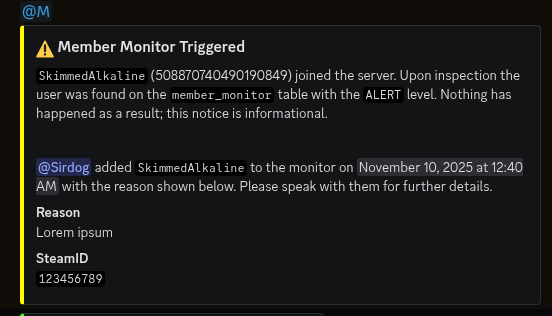
A screenshot of the output of the member monitor when a user joins with the ALERT level.
When /monitor is successfully ran with the action set to Add the information is stored in the EnduraBot database.
listener/member_monitor.py listens to the on_member_join event of the Discord API. When someone joins, a check is made to see if their Discord ID matches any entry in the monitoring table. If so, EnduraBot takes the action associated with the account's monitoring level.